
How to Govern AI Tools Your Team Uses Without You
Your team is already using AI tools you have not approved. Some of those tools are touching customer information, vendor contracts, payroll details, and the books you rely on to make important decisions. You probably have little visibility into which tools, which people, or which categories of data are involved. That gap is what people now call shadow AI, and at MATAX, we encounter some version of it inside almost every startup we work with. The encouraging part is that you can govern AI tools your team uses without slowing the work down or banning anything. The actual playbook is to bring the use into the open, sort it by risk, and give people a clear path to do their jobs safely with the tools they already want to reach for.
This is a practical how-to for any business leader who wants a real answer instead of a forty-page policy document, written for founders working through AI automation decisions right now.
Yes, Your Team Is Already Using AI You Did Not Sanction
Let me start with a reality check that consistently lands harder than founders expect when we walk through the numbers.
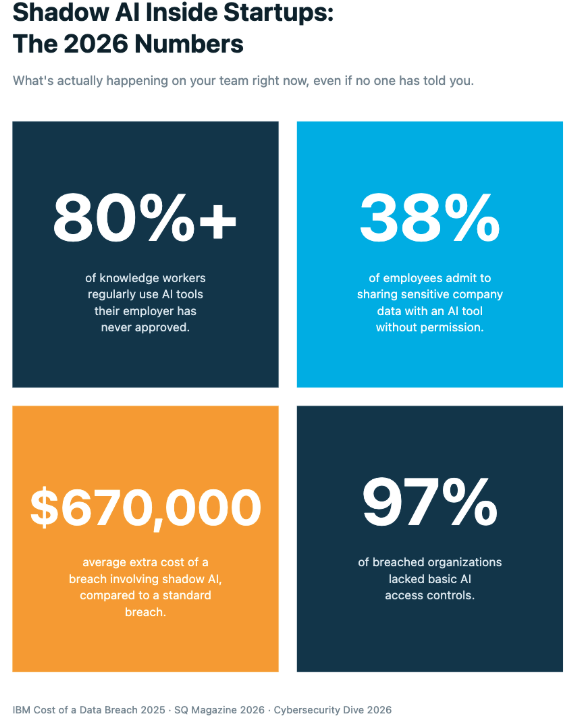
A 2026 review found that more than eighty percent of knowledge workers regularly use generative AI tools that their employer has never officially approved (SQ Magazine, 2026). About thirty-eight percent of employees admit to sharing sensitive company data with an AI tool without permission, and executives are quietly the heaviest shadow AI users in the building (Cybersecurity Dive, March 2026).
The downstream risk is no longer theoretical. IBM's 2025 Cost of a Data Breach Report found that breaches involving shadow AI cost companies an average of $670,000 more than standard incidents, one in five organizations reported a breach tied to shadow AI use, and ninety-seven percent of breached organizations lacked basic AI access controls (IBM Cost of a Data Breach Report 2025).
If you run a saas startup, this exposure matters more, not less. Your team is small, your processes are still informal, and each person handles much more sensitive data than they would inside a five-hundred-person company. The honest question is no longer whether your team uses AI, because they demonstrably do. The actual question is whether you have meaningful visibility into how the tools are used and which categories of data are involved.
Why "Just Ban Everything" Quietly Fails
Some founders try to address this with a Slack message that prohibits any use of ChatGPT for company work, and that message will be quietly ignored by the end of the week, regardless of how firmly it was originally communicated.
The reason is simple. The AI tools your team is reaching for are solving real problems faster than your existing process can. They speed up document processing, draft routine email automation copy, summarize meetings, and quietly handle pieces of back-office operations that used to take hours. When you ban them, you are asking your team to slow down, and you have no real way to enforce it. People will keep using the tools. They will just stop telling you about it.
The other reason a blanket ban fails is that AI is now built into almost every tool your team already uses. ChatGPT lives inside browser extensions, Notion AI is woven into the docs your team writes in, Gemini sits inside Gmail, Slack ships with Slack AI, and Xero is rolling out generative AI features inside the accounting workflow. You cannot ban your way through this landscape. You can only design your way through it, which is the work MATAX does alongside hundreds of startup founders.
A Five-Step Approach to Govern AI Tools Your Team Uses
Here is the practical sequence we walk founders through. Most of it can be completed in a single focused afternoon, and the goal is to begin building visibility rather than to achieve immediate perfection across every workflow.
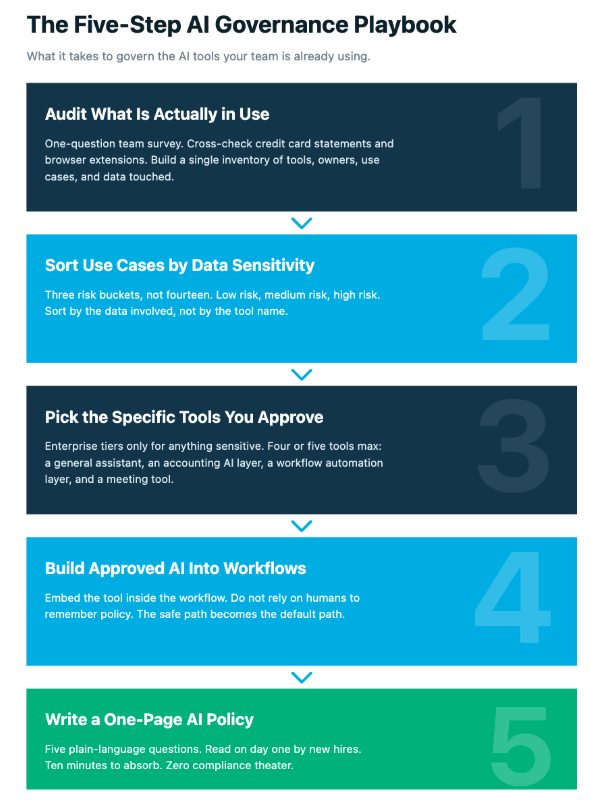
Step 1: Run an Honest Audit of What Is Actually in Use
Open a shared doc and send a one-question survey to your team. Ask people directly: which AI tools have you used for work in the last thirty days, and what did you use them for? Most employees will tell you the truth because they are not deliberately concealing anything. They have simply never been asked the question by leadership in a structured way.
While you run the survey, pull the last three months of company credit card statements and your subscription tracker. You will find AI tools you forgot you were paying for, and AI subscriptions no one ever told you about (Aqtive Guard, AI Inventory Visibility Guide 2026). Document everything in a single inventory: tool name, owner, primary use case, and the data it touches. That doc becomes your governance starting line.
Step 2: Sort the Use Cases by Data Sensitivity, Not by Tool
Not all AI use carries equal risk. Drafting a Slack post is structurally different from pasting payroll information into a public chatbot, and your governance should reflect that distinction. You do not need fourteen different policies, but you do need three risk buckets your team can actually remember without referencing a document.
Low risk covers brainstorming, rewording emails, summarizing public articles, and drafting marketing copy with no customer data. Any approved tool is fine, with no special review needed.
Medium risk covers internal docs without customer or vendor data, cleanup of meeting notes, first-pass analysis, and early drafts. This needs an approved tool, ideally an enterprise version that does not train on your inputs.
High risk covers anything touching customer data, vendor contract terms, payroll, banking details, board materials, accounting records, or anything covered by an NDA. This needs an approved tool with the correct data handling agreement, plus a documented human review step before the output flows into anything official.
Step 3: Pick the Specific Tools You Will Approve
Most startup AI exposure traces back to people using consumer chatbots when they should be using the enterprise version of the same product. Enterprise tiers of ChatGPT, Claude, Gemini, and Microsoft Copilot all offer agreements that prevent your inputs from being used for future model training. Pick a focused, approved stack instead of a long list:
One general-purpose AI assistant, such as ChatGPT Enterprise, Claude for Work, or Gemini for Workspace
One AI layer inside your accounting platform: Xero's built-in AI features, Dext for invoice document processing, and A2X for ecommerce integration
One AI capability inside your workflow automation tool of choice, whether n8n, Zapier, or Make
One transcription and meeting automation tool with a clear data handling policy, such as Granola, Fireflies Enterprise, or Otter for Business
You need four or five tools that cover the actual jobs your team is doing, paired with a written note of which tool is approved for which job.
Step 4: Build Approved AI Directly Into Your Real Workflows
This is the step founders skip most often. It is also the step that decides whether the rest of the work actually sticks. If you only publish a list of approved tools, your team has to make a fresh decision every time a new task arrives, and decision fatigue eventually creates friction. Friction is precisely where shadow AI quietly regrows after you thought you had handled it.
Instead, embed the approved AI right inside your back office operations and your scaling startup operations. Route accounts payable invoices through Dext for document processing. Lean on the AI features inside Xero for transaction matching during the monthly close. Build the Claude or ChatGPT API call directly into your n8n email automation, with the data scope already locked down. Embed the approved tool inside your Slack automation for client onboarding rather than asking humans to remember to open it.
This is what we mean by CoreOps by MATAX. The AI is built into the workflow improvement itself, not bolted on the side. Your people do not need to remember the policy because the system enforces it for them. That is the principle behind real workflow optimization and optimizing workflow inside a scaling startup. Flexible systems built on this idea survive contact with how your team actually works, because the safe path becomes the easy path.
Step 5: Write a One-Page AI Policy Your Team Will Read
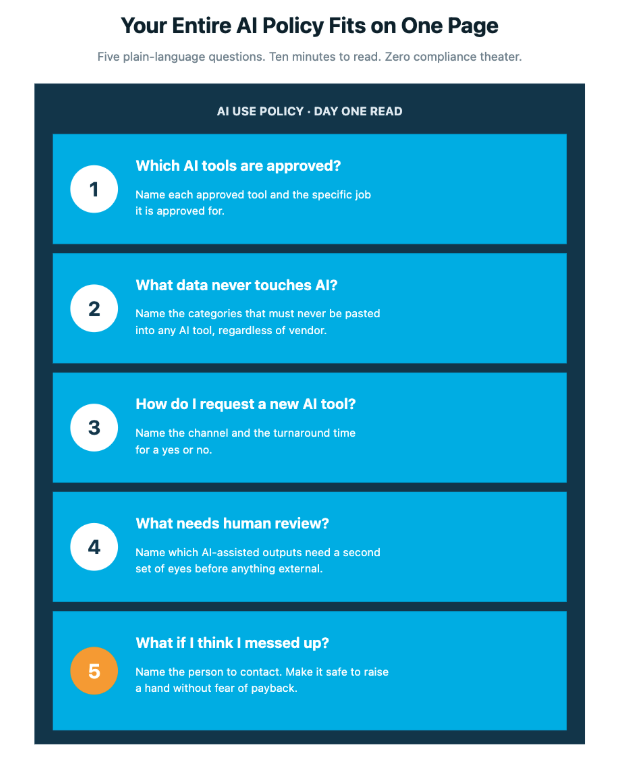
A thirty-page policy is compliance theater. A one-page policy gets read, gets remembered, and shapes daily behavior. Your one-pager should answer five plain-language questions: Which AI tools are approved, and what is each one approved for? What categories of data must never be pasted into any AI tool? Who do I talk to if I want to use a new AI tool that is not yet on the list? What needs a human review step before anything made with AI assistance leaves the building? And what should I do if I think I made a mistake and may have shared something I should not have?
That last question matters more than founders first think. People will make mistakes, and you want them surfaced fast rather than buried. Several solid templates are worth borrowing structure from, including the CloudEagle 2026 AI Policy Guide and the HR Cloud AI Tool Usage Policy Template.
Frameworks Worth Knowing Before You Build
You do not need to invent the vocabulary yourself. The NIST AI Risk Management Framework (AI RMF 1.0) is the most widely used voluntary framework in the United States, built around four functions: Govern, Map, Measure, and Manage. NIST released a major update in March 2025 covering generative AI risk, supply chain issues, and third-party model review. The framework scales down to small teams.
AI governance also matters as a sales tool because about seventy-four percent of enterprise buyers now factor governance posture into vendor choices (CyberSaint, 2026). A one-page AI policy is a real edge in procurement and shows up more often in Series A and Series B due diligence each quarter. Employment lawyers are paying close attention to (Foley & Lardner, April 2026).
What Healthy AI Governance Looks Like
The founder knows which AI tools the team uses, because there is a shared inventory and a specific person owns updating it each quarter. The team uses approved enterprise versions of the chatbots they actually want, so no one is pasting customer info into a free consumer account.
The accounting team uses AI features inside Xero, Dext, and Ramp accounting automation rather than reaching for a sidebar chatbot, which makes the integration roi measurable and lifts operational efficiency without exposing the underlying records. The operations lead uses meeting automation tools governed by a clear data agreement, so transcripts flow into one approved location.
There is one page of policy, read by new hires on day one as part of onboarding. When someone wants a new AI tool, there is a designated Slack channel and a twenty-four-hour answer. Fast governance beats slow governance, because slow governance lands the same outcome as no governance at all. The result is measurable increased productivity without the data risk that ungoverned use introduces.
Frequently Asked Questions
How do I find out which AI tools my team is actually using?
Ask them directly. A sixty-second Slack survey will surface most of it. Cross-check the answers against credit card statements, browser extensions, and your subscription tracker. People are not hiding their tool choices; they have just never been asked. The full audit step usually takes about an hour for a sub-thirty-person team.
Do I really need a written AI policy if we are only ten people?
Yes, and the smaller you are, the more it pays off. Smaller teams handle more sensitive data per person. A one-page policy plus a small approved stack costs you a single afternoon of leadership focus, while the IBM 2025 breach data shows the average shadow AI incident adds $670,000 to a breach.
Can I use no-code automation tools to enforce my AI policy?
You can, and you should. No-code integration solutions including n8n, Make, and Zapier let you embed approved AI calls right inside the workflows your team already uses. The workflow runs the right tool with the right data scope on its own, which is one of the fastest paths to lowering shadow AI exposure while keeping team productivity and operational efficiency high.
What about the AI features inside our existing accounting tools?
The AI features inside Xero, Dext, A2X, and Ramp accounting automation are designed to run within your existing security and access framework. That is exactly where you want your team using AI for startup accounting work, and away from public chatbots for sensitive operational data.
Where MATAX Fits
We work with founders on this exact problem nearly every week. The pattern repeats: a scaling startup hits fifteen to thirty people, the back office grows messy, the team patches the mess with AI tools they found on their own, and the founder wakes up realizing they have no clear sense of what data is flowing where.
We help with three things. We assess what is actually happening with AI inside your back office operations. We design the approved stack, the risk matrix, and the one-page policy your team will read. Then we build the AI workflows directly into your accounting and operations layer, so the safe path becomes the default path. That is the CoreOps by MATAX approach in practice.
Founders who do this work capture the productivity benefits of business automation and AI-powered integrations without absorbing the data exposure that ungoverned tools bring. Founders who postpone it are quietly betting that the IBM breach numbers do not apply to their company, and that bet has gotten substantially more expensive over the last two years. The right starting point is the audit.
Dawn Hatch is the Founding Partner of MATAX, a San Francisco-based firm specializing in Xero implementation, AI workflow automation, and operations infrastructure for tech startups. MATAX is a two-time Xero Partner of the Year and Xero's 2025 Advisory Innovator of the Year.
